Webhooks
- Webhooks | Developer Documentation
- Create a webhook endpoint | Developer Documentation
- Create a test webhook endpoint | Developer Documentation
- business_capability_update webhook reference | Developer Documentation
- history webhook reference | Developer Documentation
- message_template_components_update webhook reference | Developer Documentation
- message_template_quality_update webhook reference | Developer Documentation
- message_template_status_update webhook reference | Developer Documentation
- messages webhook reference | Developer Documentation
- Button messages webhook reference | Developer Documentation
- Contacts messages webhook reference | Developer Documentation
- Edit messages webhook reference | Developer Documentation
- Errors messages webhooks reference | Developer Documentation
- Group messages webhook reference | Developer Documentation
- Interactive messages webhook reference | Developer Documentation
- Location messages webhook reference | Developer Documentation
- Order messages webhook reference | Developer Documentation
- Reaction messages webhook reference | Developer Documentation
- Status messages webhook reference | Developer Documentation
- System messages webhook reference | Developer Documentation
- Text messages webhook reference | Developer Documentation
- Unsupported messages webhook reference | Developer Documentation
- partner_solutions webhook reference | Developer Documentation
- payment_configuration_update webhook reference | Developer Documentation
- phone_number_name_update webhook reference | Developer Documentation
- phone_number_quality_update webhook reference | Developer Documentation
- security webhook reference | Developer Documentation
- smb_app_state_sync webhook reference | Developer Documentation
- smb_message_echoes webhook reference | Developer Documentation
- template_category_update webhook reference | Developer Documentation
- user_preferences webhook reference | Developer Documentation
- automatic_events webhook reference | Developer Documentation
- Webhook overrides | Developer Documentation
Webhooks | Developer Documentation
Webhooks
Updated: Dec 2, 2025
This document describes webhooks and how they are used by the WhatsApp Business Platform.
Webhooks are HTTP requests containing JSON payloads that are sent from Meta’s servers to a server of your designation. The WhatsApp Business Platform uses webhooks to inform you of incoming messages, the status of outgoing messages, and other important information, such as changes to your account status, messaging capability upgrades, and changes to your template quality scores.
For example, this is a webhook describing a message sent from a WhatsApp user to a business:
Create a webhook endpoint
To receive webhooks, you must create and configure a webhook endpoint. To create your own endpoint, see our Create a webhook endpoint document
If you aren’t ready to create your own endpoint yet, you can create a test webhook endpoint that logs webhook payloads to the console. Note, however, that before you can use your app in a production capacity, you must create your own endpoint.
Permissions
You will need the following permissions to receive webhooks:
whatsapp_business_messaging — for messages webhookswhatsapp_business_management — for all other webhooks
If you are a direct developer, use your system user to grant your app these permissions when generating your system token.
If you are a solution provider and need these permissions to provide appropriate services to your business customers, you must be approved for advanced access for the permissions via App Review before your business customers will be able to grant your app these permissions during onboarding.
Fields
Once you created and configured your webhook endpoint (or have set up a test webhook endpoint), use the App Dashboard > WhatsApp > Configuration panel to subscribe to individual webhook fields.
Note that if you created your app using the Connect with customers through WhatsApp use case, navigate to App Dashboard > Use cases > Customize > Configuration instead.
| Field name | Description |
|---|---|
|
The account_alerts webhook notifies you of changes to a business phone number’s messaging limit, business profile, and Official Business Account status. | |
|
The account_review_update webhook notifies you when a WhatsApp Business Account has been reviewed against our policy guidelines. | |
|
The account_update webhook notifies of changes to a WhatsApp Business Account’s partner-led business verification submission, its authentication-international rate eligibility, or primary business location, when it is shared with a Solution Partner, policy or terms violations, offboarding, reconnection, or when it is deleted. | |
|
The automatic_events webhook notifies you when we detect a purchase or lead event in a chat thread between you and a WhatsApp user who has messaged you via your Click to WhatsApp ad, if you have opted-in to Automatic Events reporting. | |
|
The business_capability_update webhook notifies you of WhatsApp Business Account or business portfolio capability changes (messaging limits, phone number limits, etc.). | |
|
The history webhook is used to synchronize the WhatsApp Business app chat history of a business customer onboarded by a solution provider. | |
|
The message_template_components_update webhook notifies you of changes to a template’s components. | |
|
The message_template_quality_update webhook notifies you of changes to a template’s quality score. | |
|
The message_template_status_update webhook notifies you of changes to the status of an existing template. | |
|
The messages webhook describes messages sent from a WhatsApp user to a business and the status of messages sent by a business to a WhatsApp user. | |
|
The partner_solutions webhook describes changes to the status of a Multi-Partner Solution. | |
|
The payment_configuration_update webhook notifies you of changes to payment configurations for Payments API India and Payments API Brazil. | |
|
The phone_number_name_update webhook notifies you of business phone number display name verification outcomes. | |
|
The phone_number_quality_update webhook notifies you of changes to a business phone number’s throughput level. | |
|
The security webhook notifies you of changes to a business phone number’s security settings. | |
|
The smb_app_state_sync webhook is used for synchronizing contacts of WhatsApp Business app users who have been onboarded via a solution provider. | |
|
The smb_message_echoes webhook notifies you of messages sent via the WhatsApp Business app or a companion (“linked”) device by a business customer who has been onboarded to Cloud API via a solution provider. | |
|
The template_category_update webhook notifies you of changes to template’s category. | |
|
The user_preferences webhook notifies you of changes to a WhatsApp user’s marketing message preferences. |
Override webhooks
You can use an alternate webhook endpoint for certain webhook fields for your WhatsApp Business Account (WABA) or business phone number. This can be useful for testing purposes, or if you are a solution provider and wish to use unique webhook endpoints for each of your onboarded customers.
See our Webhook overrides document to learn how to override webhooks.
Payload size
Webhook payloads can be up to 3 MB.
Webhook delivery failure
If we send a webhook request to your endpoint and your server responds with an HTTP status code other than 200, or if we are unable to deliver the webhook for another reason, we will keep trying with decreasing frequency until the request succeeds, for up to 7 days.
Note that retries will be sent to all apps that have subscribed to webhooks (and their appropriate fields) for the WhatsApp Business Account. This can result in duplicate webhook notifications.
Mutual TLS
Webhooks support mutual TLS (mTLS) for added security. See Graph API’s mTLS for webhooks document to learn how to enable and use mTLS.
IP addresses
You can get the IP addresses of our webhook servers by running the following command in your terminal:
whois -h whois.radb.net —'-i origin AS32934'| grep '^route'| awk '{print $2}'| sortYou can also use our geofeed to download a CSV that lists our IP addresses.
Note, however, that we periodically change our IP addresses, so to avoid having to regenerate your list of allowed IP addresses, we recommend that you use mTLS instead.
Troubleshooting
If you are not receiving webhooks:
Make sure your endpoint is accepting requests.Send a test payload to your endpoint via the App Dashboard > WhatsApp > Configurations panel.Make sure your app is in Live mode; some webhooks will not be sent if your app is in Dev mode.Use our test webhook endpoint. If the test endpoint is digesting webhook payloads and displaying them in the console, the issue is likely with your endpoint code.
Learn more
Create a webhook endpoint | Developer Documentation
Create a webhook endpoint
Updated: Nov 7, 2025
Learn about webhook requests and responses so you can set up and configure your own webhook endpoint on a public server.
Before you can use your app in a production capacity, you must create and configure your own webhook endpoint on a public server that can accept and respond to GET and POST requests, and that can validate and capture webhook payloads.
TLS/SSL
Your webhook endpoint server must have a valid TLS or SSL digital security certificate, correctly configured and installed. Self-signed certificates are not supported.
mTLS
Webhooks support mutual TLS (mTLS) for added security. See Graph API's mTLS for webhooks document to learn how to enable and use mTLS.
Note that enabling and disabling mTLS is not supported at the WABA or business phone number level. If you have more than one application accessing the platform, you will need to enable mTLS for each application.
GET requests
GET requests are used to verify your webhook endpoint. Anytime you set or edit the Callback URL field or the Verify token field in the App Dashboard, Meta will send a GET request to your webhook endpoint. You must validate and respond to this request.
Request parameters
| Placeholder | Description | Example value |
|---|---|---|
<CALLBACK_URL> |
Your webhook endpoint URL.
Add this URL to the Callback URL field in the App Dashboard when you configure webhooks later. |
https://www.luckyshrub.com/webhooks |
<HUB.CHALLENGE> |
A random string that Meta will generate. |
1158201444 |
<HUB.VERIFY_TOKEN> |
A verification string of your own choosing. Store this string on your server.
Add this string to the Verify token field in the App Dashboard when you configure webhooks later. |
vibecoding |
Validation
To validate GET requests, compare the
hub.verify_token value in the request to the verification string you have stored on your server. If the values match, the request is valid, otherwise it is invalid.Response
If the request is valid, respond with HTTP status
200 and the hub.challenge value. If the request is invalid, respond with a 400-level HTTP status code, or anything other than status 200.When you configure webhooks, Meta will send a GET request to your webhook endpoint. If it returns status
200 and the hub.challenge value included in the request, Meta will consider your webhook endpoint verified, and begin sending you webhooks. If your webhook endpoint responds with anything else, however, Meta will consider your webhook endpoint unverified, and webhooks will not be sent to your endpoint.Configure webhooks
Once you have created your webhook endpoint, navigate to the App Dashboard > WhatsApp > Configuration panel, and add your webhook endpoint URL to the Callback URL field, and your verification string to Verify token field.
Note that if you created your app using the Connect with customers through WhatsApp use case, navigate to App Dashboard > Use cases > Customize > Configuration instead.
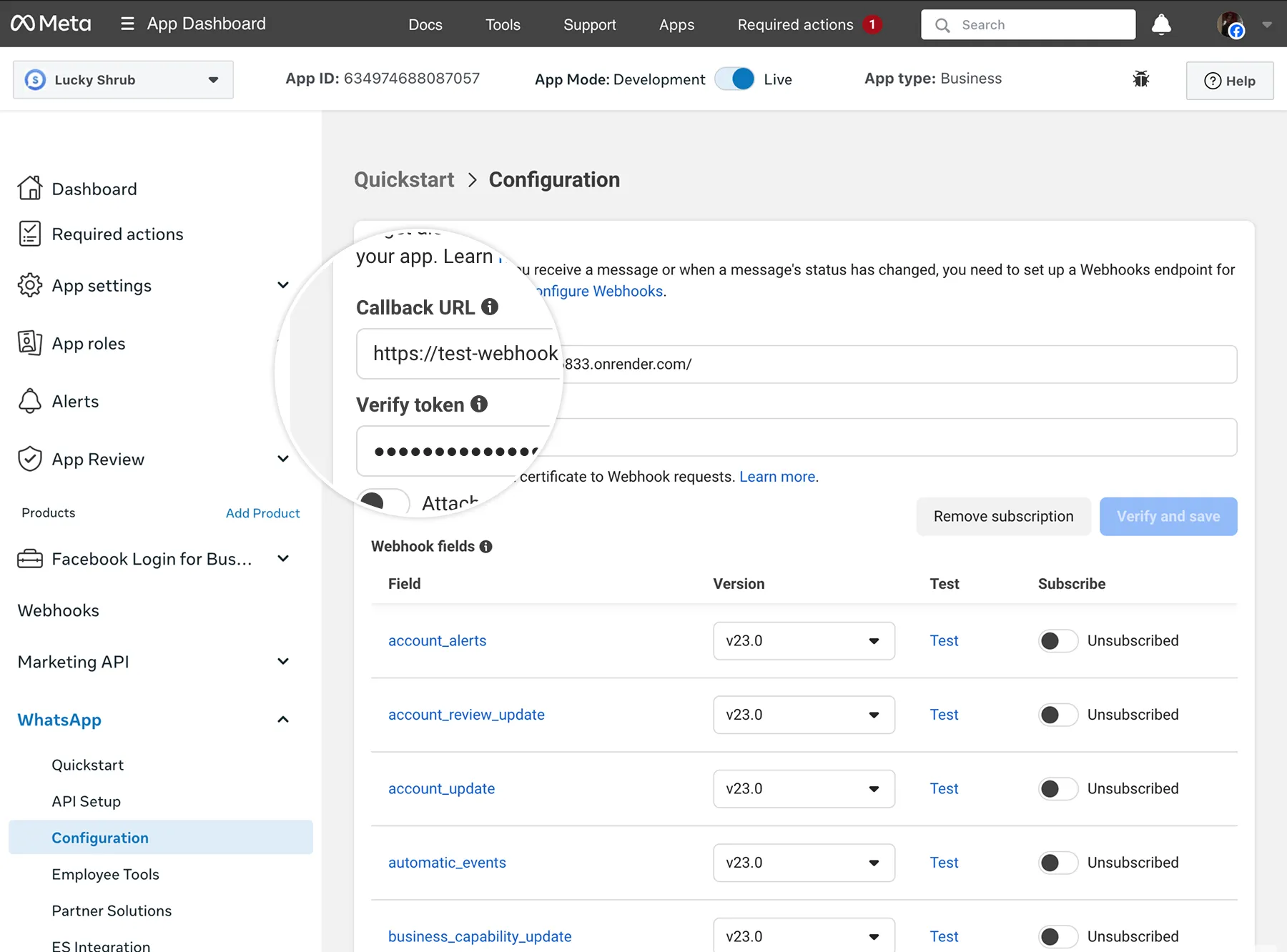
If your webhook endpoint is responding to webhook verification GET requests properly, the panel will save your changes, and a list of fields you can subscribe to will appear. You can then subscribe to any fields that fulfill your business needs.
Note that you can use the POST Application Subscriptions endpoint to configure webhooks as an alternative method, but it requires the use of an app token. See Graph API's Subscriptions edge document to learn how to do this, and use whatsapp_business_account as the object value.
Create a test webhook endpoint | Developer Documentation
Create a test webhook endpoint
Updated: Nov 7, 2025
If you aren’t ready to create your own webhook endpoint yet, you can deploy a test webhook app on Render.com that accepts webhook requests and dumps their contents to Render’s console.
Only use this app for testing purposes.
Requirements
Step 1: Create a GitHub repository
Sign into your GitHub account and create a new repo (public or private) with a name of your choice. Within the repo, create an
app.js file and paste this code into it:Step 2: Deploy a Node Express app on Render
Follow Render’s instructions for deploying a Node Express app, with these differences:
npm install expressStart command: node app.jsIn the Environment Variables section, add the variable VERIFY_TOKEN and set it to a string of your choice (e.g. vibecode).
When you’re done, click the Deploy your web service button. This will take you to the app log where you will see your app being built, which can take a few minutes. You’ll know it’s done when you see “Your service is live” in the log.
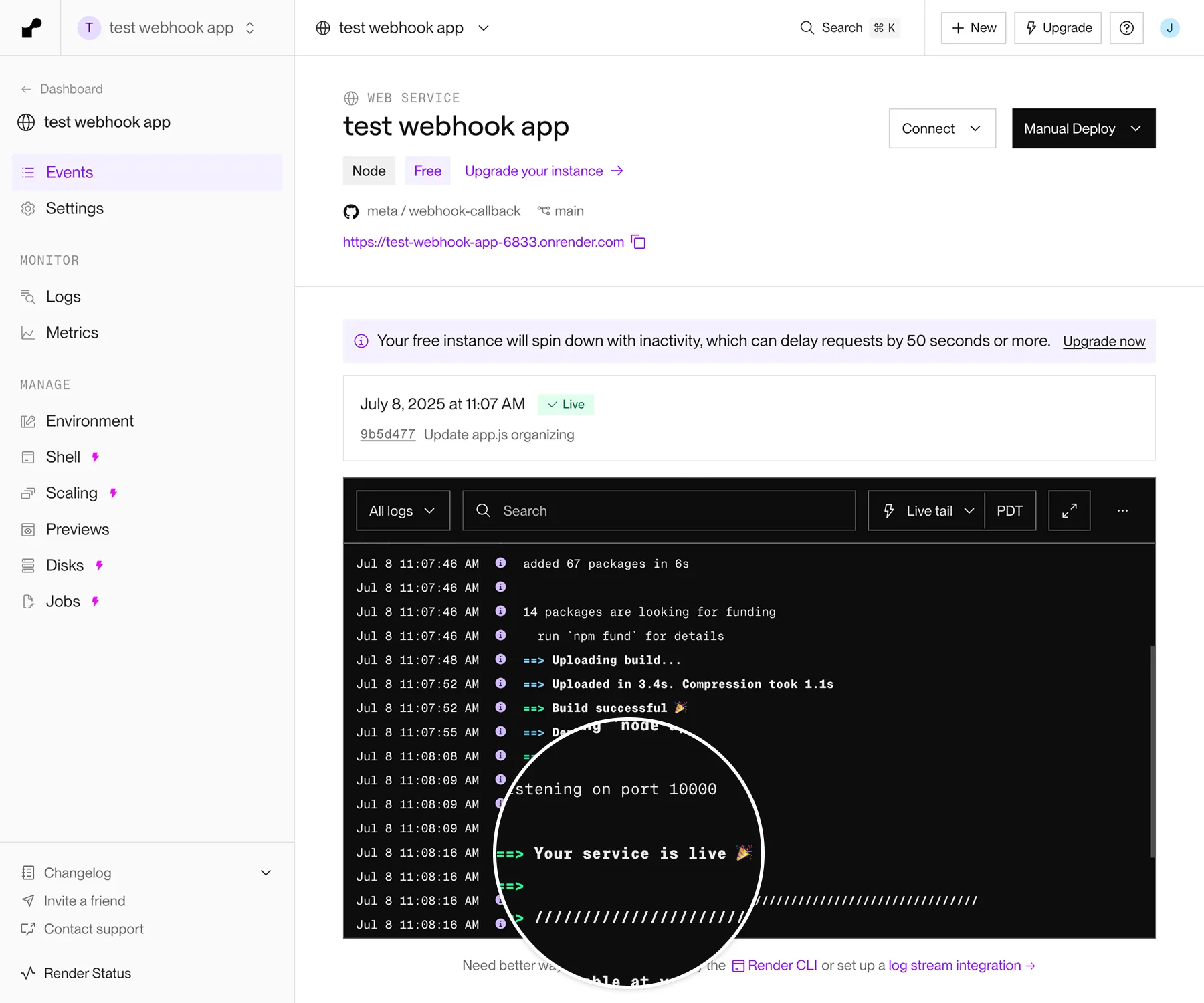
Copy your deployed test webhook app URL, which is displayed at the top of the page under your GitHub repo name. (If you view the URL, you’ll get a 403 error, which is expected).
Step 3: Add your test webhook app URL to your Meta app
Open a new window/tab, and navigate to the (Meta) App Dashboard > WhatsApp > Webhooks > Configuration panel.
Paste your test webhook app URL in the Callback URL field, and add the
VERIFY_TOKEN environment variable string you set earlier to the Verify token field, then click Verify and save.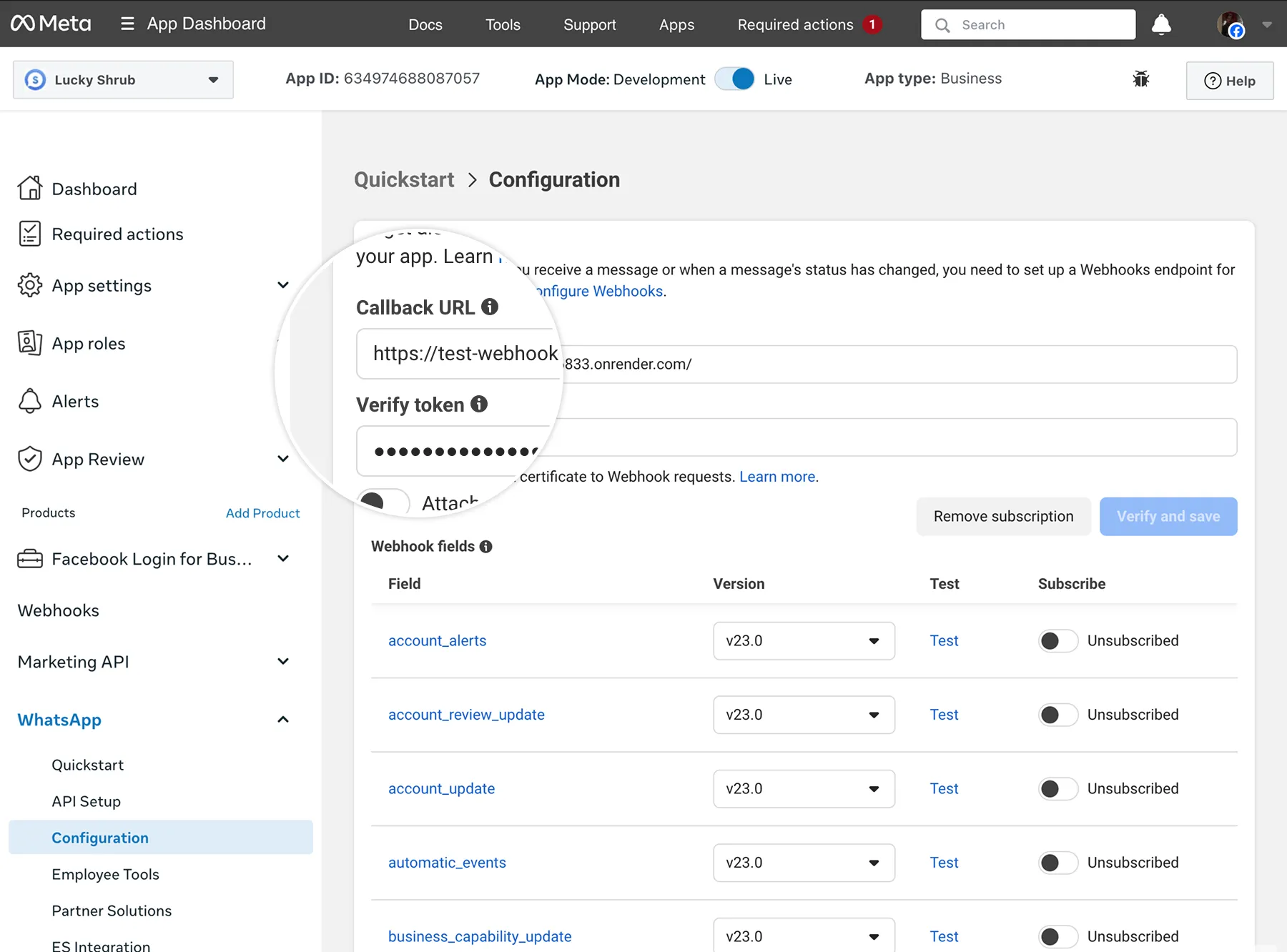
If verification is successful, the Meta app dashboard should refresh and you should see a list of webhook fields you can subscribe to.
Subscribe to the messages webhook field if you haven’t already.
Also, in Render’s app log, if you see “WEBHOOK VERIFIED”, your test webhook app URL has been successfully verified.
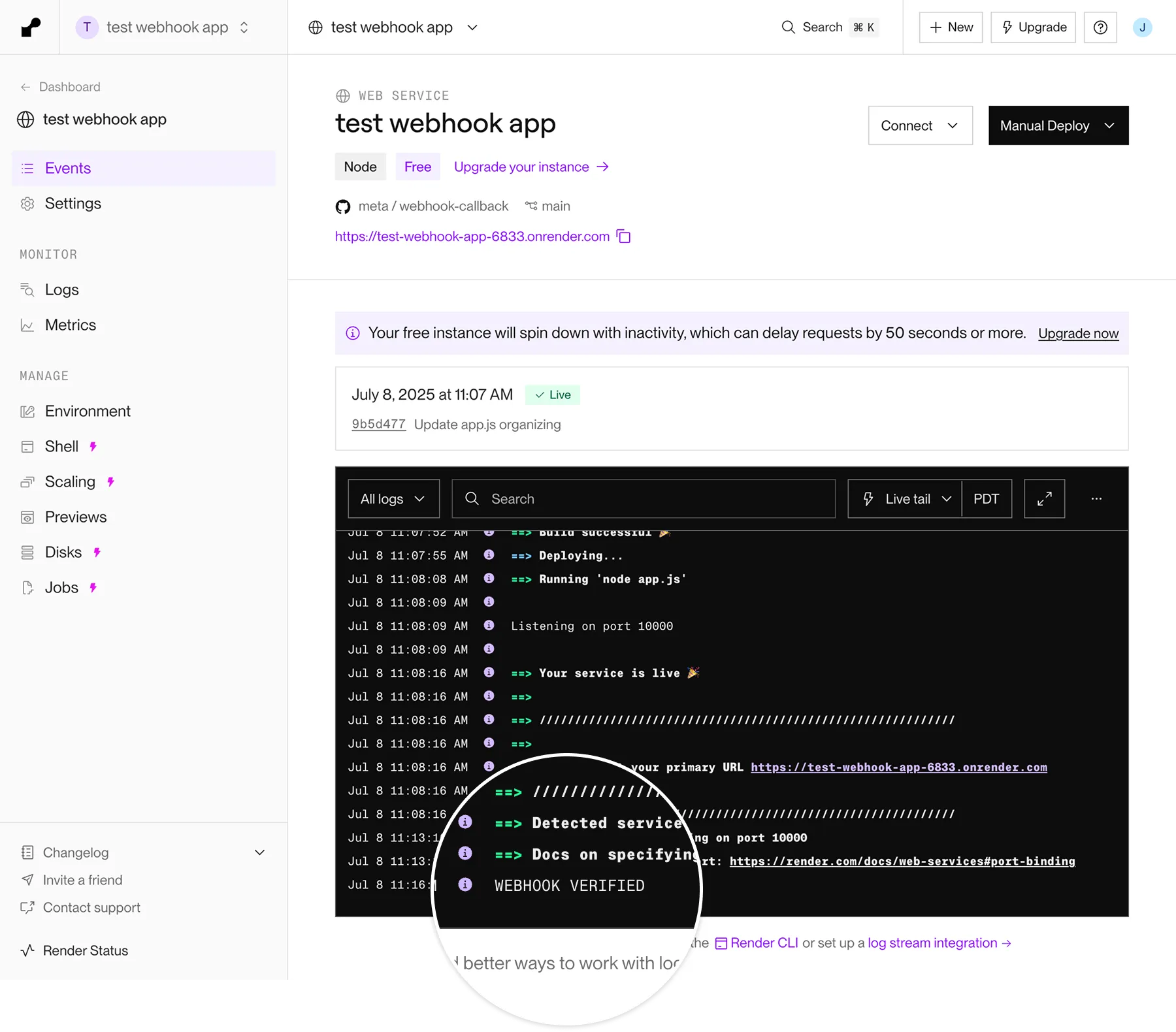
Step 4: Send a test message
Back in the Meta app dashboard Configuration panel, scroll down to the messages webhook field, subscribe to the field if you haven’t already, then click the Test link.
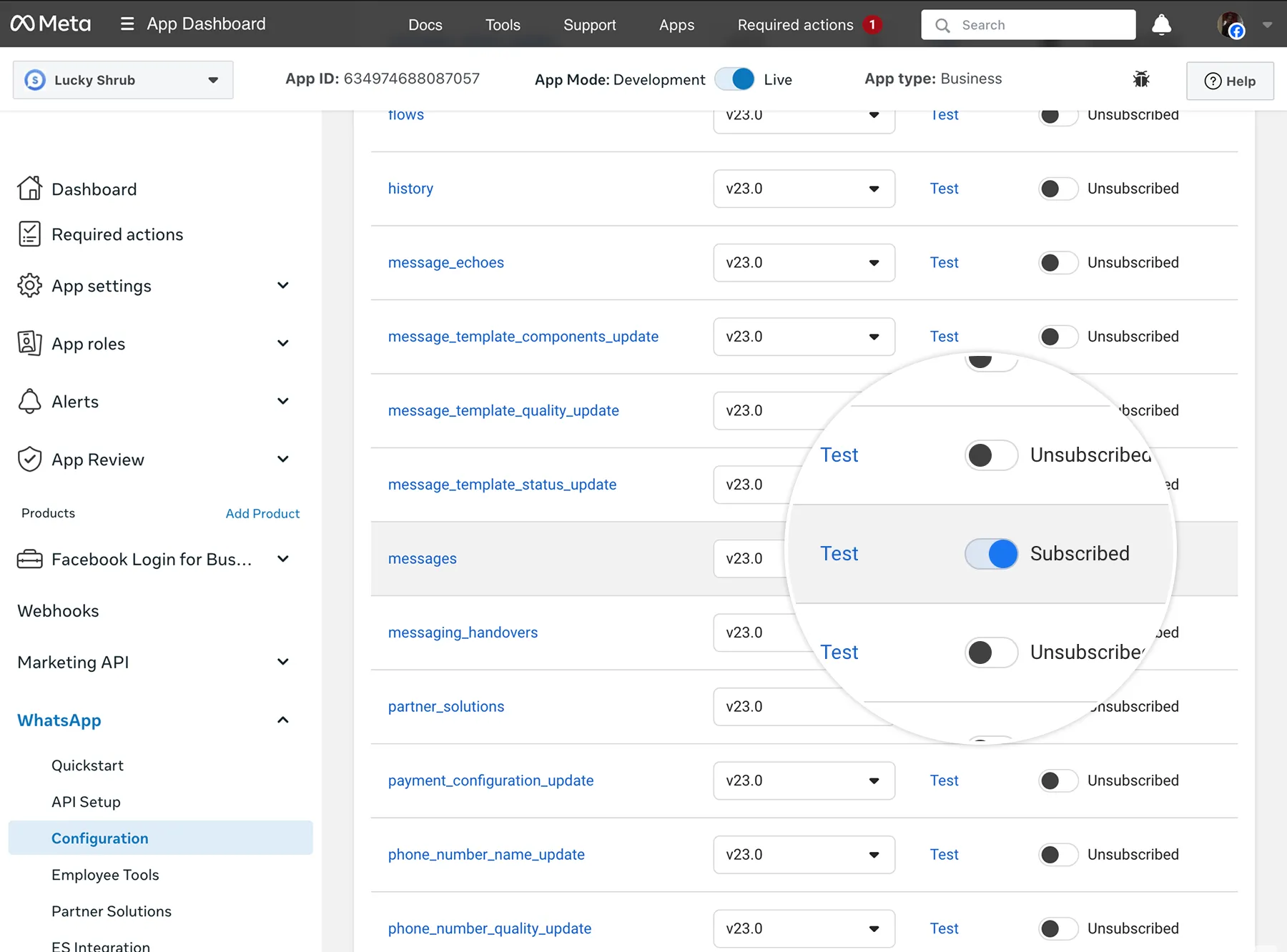
This will send a test message to your test webhook app. Confirm that it appears in Render app log with “Webhook received” followed by a test JSON payload:
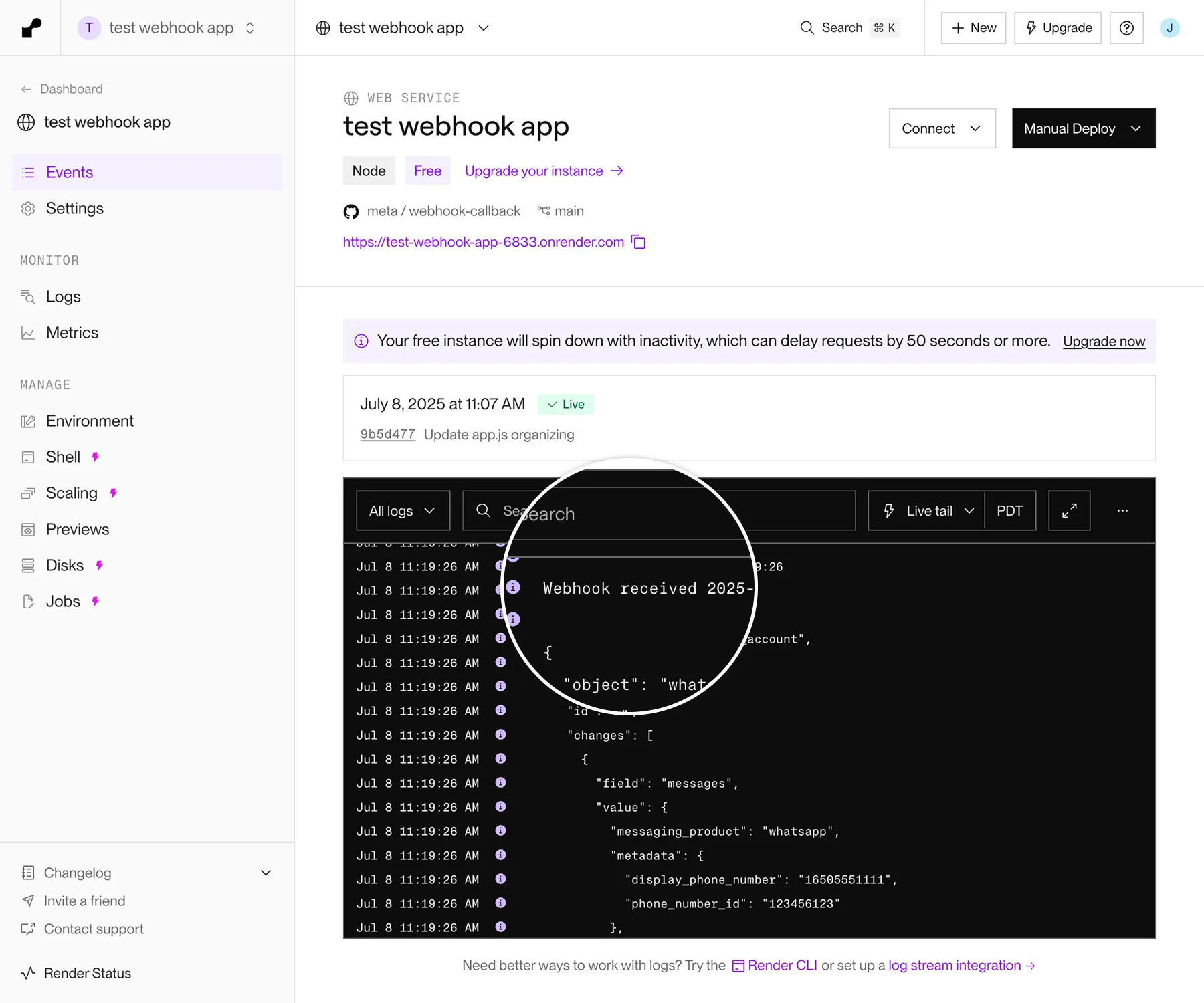
Troubleshooting
If the test messages webhook doesn’t appear in the Render app dashboard log:
business_capability_update webhook reference | Developer Documentation
business_capability_update webhook reference
Updated: Nov 14, 2025
This reference describes trigger events and payload contents for the WhatsApp Business Account business_capability_update webhook.
The business_capability_update webhook notifies you of WhatsApp Business Account or business portfolio capability changes (messaging limits, phone number limits, etc.).
Triggers
Parameters
| Placeholder | Description | Example value |
|---|---|---|
<MAX_DAILY_CONVERSATIONS_PER_PHONE>Integer |
This parameter will be removed in February, 2026. Use
max_daily_conversations_per_business instead.Business portfolio's messaging limit. Values can be: 250200010000100000-1
A value of -1 indicates unlimited messaging. |
2000 |
<MAX_DAILY_CONVERSATIONS_PER_BUSINESS>Integer |
TIER_UNLIMITED | |
<MAX_PHONES_PER_BUSINESS_PORTFOLIO>Integer |
Maximum number of business phone numbers the business portfolio can have.
This property is only included if max_daily_conversation_per_phone is set to 250. |
2 |
<MAX_PHONES_PER_WHATSAPP_BUSINESS_ACCOUNT>Integer |
Maximum number of business phone numbers allowed per WABA.
This property is only included if max_daily_conversation_per_phone is not set to 250. |
25 |
<WEBHOOK_TRIGGER_TIMESTAMP>Integer |
Unix timestamp indicating when the webhook was triggered. |
1739321024 |
<WHATSAPP_BUSINESS_ACCOUNT_ID>String |
WhatsApp Business Account ID. |
102290129340398 |
history webhook reference | Developer Documentation
history webhook reference
Updated: Dec 12, 2025
This reference describes trigger events and payload contents for the WhatsApp Business Account
history webhook.The history webhook is used to synchronize the WhatsApp Business app chat history of a business customer onboarded by a solution provider.
Triggers
Chat history sharing approved
Chat history contents
If the business customer has already approved chat history sharing when the solution provider requests the business's chat history, a series of history webhooks will be triggered, describing all messages sent or received within 180 days of the time when the business was onboarded onto Cloud API.
Messages that are part of a group chat will not be included.Media messages will not include media asset IDs. Instead, additional history webhooks containing media message asset IDs will be sent separately, but only for media messages sent within 14 days of onboarding.
Note that for efficiency purposes, a single webhook could potentially describe thousands of messages, so we recommend that you capture its contents first, then process the contents asynchronously.
Phases and chunks
Webhooks are divided into three history phases, where day 0 indicates the time when the business was onboarded onto Cloud API:
phase 0: day 0 through day 1phase 1: day 1 through day 90phase 2: day 90 through day 180
For each phase, chat history webhooks may be sent in separate chunks, depending on the total number of messages that comprise the thread.
You can use the chunk_order parameter value to arrange these chunks in their sequential order, as they may not be delivered sequentially.You can use the phase parameter value to monitor phase progress. A value of 2 indicates that the current phase is complete.You can use the progress parameter value to monitor the overall progress. A value of 100 indicates that synchronization is complete.
If there is no chat history available for a given phase, no corresponding webhooks will be sent.
Parameters
| Placeholder | Description | Example value |
|---|---|---|
<BUSINESS_OR_WHATSAPP_USER_PHONE_NUMBER>String |
The business customer's phone number, or the WhatsApp user's phone number.
If the value is the business's phone number, the message object describes a message sent by the business to a WhatsApp user.
If the value is the WhatsApp user's phone number, the message object describes a message sent by the WhatsApp user to the business. |
15550783881 |
<CHUNK_ORDER>Integer |
Indicates chunk number, which you can use to order sets of webhooks sequentially. |
1 |
<CUSTOMER_WABA_ID>String |
The business customer's WhatsApp Business Account ID. |
102290129340398 |
<CUSTOMER_DISPLAY_PHONE_NUMBER>String |
The business customer's business phone number. |
15550783881 |
<CUSTOMER_PHONE_NUMBER_ID>String |
The business customer's business phone number ID. |
106540352242922 |
<DEVICE_TIMESTAMP>String |
Unix timestamp indicating when the message was received by the recipient's device. |
1738796547 |
<MESSAGE_CONTENTS>Object |
An object describing the message's contents. This value will vary based on the message type, as well as the contents message.
For example, if a business sends an
image message without a caption, the object would not include the caption property.See Sending messages for examples of payloads for each message type. |
|
<MESSAGE_STATUS>String |
Indicates the message's most recent delivery stats. Values can be: DELIVEREDERRORPENDINGPLAYEDREADSENT |
READ |
<MESSAGE_TYPE>String |
Message type. Note that this placeholder appears twice in the syntax above, as it serves as a placeholder for the
type property's value and its matching property name. See the example payload below for a thread with various message types.If this value is set to media_placeholder, the message object describes a message that contained a media asset. In this case, the message contents will be omitted. Instead, a separate history webhook will follow, describing the content of the message and the media asset ID, but only if the message was sent within the last two weeks of your query. See the example payloads below describing a media message's contents. |
text |
<PHASE>Integer |
Indicates history phase. Values can be: 0 - indicates messages are from day 0 (business onboarding time) through day 11 - indicates messages are from day 1 through day 902 - indicates messages are from day 90 through day 180 |
1 |
<PROGRESS>Integer |
Indicates percentage total of synchronization progress.
Minimum 0, maximum 100. |
55 |
<WHATSAPP_MESSAGE_ID>String |
WhatsApp message ID. |
wamid.HBgLMTY1MDM4Nzk0MzkVAgASGBQzQUFERjg0NDEzNDdFODU3MUMxMAA= |
<WHATSAPP_USER_PHONE_NUMBER>String |
The WhatsApp user's phone number.
The to property is only included if the message object represents an SMB message echo. |
16505551234 |
Chat history sharing declined
Parameters
| Placeholder | Description | Example value |
|---|---|---|
<CUSTOMER_DISPLAY_PHONE_NUMBER>String |
The business customer's business phone number. |
15550783881 |
<CUSTOMER_PHONE_NUMBER_ID>String |
The business customer's business phone number ID. |
106540352242922 |
message_template_components_update webhook reference | Developer Documentation
message_template_components_update webhook reference
Updated: Nov 14, 2025
This reference describes trigger events and payload contents for the WhatsApp Business Account
message_template_components_update webhook.The message_template_components_update webhook notifies you of changes to a template's components.
Triggers
Parameters
| Placeholder | Description | Example value |
|---|---|---|
<BUTTON_LABEL_TEXT>String |
Button label text. |
Email support |
<BUTTON_PHONE_NUMBER>String |
Button phone number. |
+15550783881 |
<BUTTON_TYPE>String |
Values can include:
CATALOGCOPY_CODEEXTENSIONFLOW, MPMORDER_DETAILSOTPPHONE_NUMBERPOSTBACKREMINDERSEND_LOCATIONSPMQUICK_REPLYURLVOICE_CALL |
URL |
<BUTTON_URL>String |
Button URL. |
https://www.luckyshrub.com/support |
<TEMPLATE_BODY_TEXT>String |
Template body text. |
|
<TEMPLATE_FOOTER_TEXT>String |
Template footer text. |
Lucky Shrub: the Succulent Specialists! |
<TEMPLATE_HEADER_TEXT>String |
Template header text. |
Your order is confirmed! |
<TEMPLATE_ID>Integer |
Template ID. |
1315502779341834 |
<TEMPLATE_LANGUAGE_AND_LOCALE_CODE>String |
Template language and locale code. |
en_US |
<TEMPLATE_NAME>String |
Template name. |
order_confirmation |
<WEBHOOK_TRIGGER_TIMESTAMP>Integer |
Unix timestamp indicating when the webhook was triggered. |
1739321024 |
<WHATSAPP_BUSINESS_ACCOUNT_ID>String |
WhatsApp Business Account ID. |
102290129340398 |
message_template_quality_update webhook reference | Developer Documentation
message_template_quality_update webhook reference
Updated: Oct 22, 2025
This reference describes trigger events and payload contents for the WhatsApp Business Account
message_template_quality_update webhook.The message_template_quality_update webhook notifies you of changes to a template's quality score.
Triggers
Parameters
| Placeholder | Description | Example value |
|---|---|---|
<NEW_QUALITY_SCORE>String |
New template quality score.
Values can be:
GREEN - Indicates high quality.RED - Indicates low quality.YELLOW - Indicates medium quality.UNKNOWN - Indicates quality pending. |
GREEN |
<PREVIOUS_QUALITY_SCORE>String |
Previous template quality score.
Values can be:
GREEN - Indicates high quality.RED - Indicates low quality.YELLOW - Indicates medium quality.UNKNOWN - Indicates quality pending. |
YELLOW |
<TEMPLATE_ID>Integer |
Template ID. |
806312974732579 |
<TEMPLATE_NAME>String |
Template name. |
welcome_template |
<TEMPLATE_LANGUAGE_AND_LOCALE_CODE>String |
Template language and locale code. |
en-US |
<WEBHOOK_TRIGGER_TIMESTAMP>Integer |
Unix timestamp indicating when the webhook was triggered. |
1739321024 |
<WHATSAPP_BUSINESS_ACCOUNT_ID>String |
WhatsApp Business Account ID. |
102290129340398 |
message_template_status_update webhook reference | Developer Documentation
message_template_status_update webhook reference
Updated: Nov 14, 2025
This reference describes trigger events and payload contents for the WhatsApp Business Account
message_template_status_update webhook.The message_template_status_update webhook notifies you of changes to the status of an existing template.
Triggers
Parameters
| Placeholder | Description | Example value |
|---|---|---|
<DESCRIPTION>String |
String describing why the template was locked or unlocked. |
Your WhatsApp message template has been unpaused. |
<DISABLE_TIMESTAMP>Integer |
Unix timestamp indicating when the template was disabled. |
1751234563 |
<EVENT>String |
Template status event. Values can be:
APPROVED - Indicates the template has been approved and can now be sent in template messages.ARCHIVED: Indicates the template has been archived to keep the list of templates in WhatsApp manager clean. DELETED - Indicates the template has been deleted.DISABLED - Indicates the template has been disabled due to user feedback.FLAGGED - Indicates the template has received negative feedback and is at risk of being disabled.IN_APPEAL - Indicates the template is in the appeal process.LIMIT_EXCEEDED - Indicates the WhatsApp Business Account template is at its template limit.LOCKED - Indicates the template has been locked and cannot be edited.PAUSED - Indicates the template has been paused.PENDING - Indicates the template is undergoing template review.REINSTATED - Indicates the template is no longer flagged or disabled and can be sent in template messages again.PENDING_DELETION - Indicates template has been deleted via WhatsApp Manager.REJECTED - Indicates the template has been rejected. You can edit the template to have it undergo template review again or appeal the rejection. |
APPROVED |
<TEMPLATE_ID>Integer |
Template ID. |
1689556908129832 |
<TEMPLATE_NAME>String |
Template name. |
order_confirmation |
<TEMPLATE_LANGUAGE_AND_LOCALE_CODE>String |
Template language and locale code. |
en-US |
<REASON>String |
Template rejection reason, if rejected.
If the template is scheduled for deletion, the value will be
null instead of a string. Otherwise, values can be:ABUSIVE_CONTENT - Indicates template contains content that violates our policies.CATEGORY_NOT_AVAILABLE - (Deprecated) Indicates an authentication templates for an unsupported region.INCORRECT_CATEGORY - Indicates the template's content doesn't match the category designated at the time of template creation.INVALID_FORMAT - Indicates template has an invalid format.NONE: Indicates template was paused.PROMOTIONAL - Indicates template contains content that violates our policies.SCAM - Indicates template contains content that violates our policies.TAG_CONTENT_MISMATCH - Indicates the template's content doesn't match the category designated at the time of template creation. |
INVALID_FORMAT |
<TITLE>String |
Title of template pause or unpause event.
Values can be:
FIRST_PAUSE - Indicates template has been paused for the first time.SECOND_PAUSE - Indicates the template has been paused a second time.RATE_LIMITING_PAUSE - Indicates template has been paused due to rate limiting.UNPAUSE - Indicates template has been unpaused.DISABLED - Indicates template has been disabled. |
FIRST_PAUSE |
<WEBHOOK_TRIGGER_TIMESTAMP>Integer |
Unix timestamp indicating when the webhook was triggered. |
1739321024 |
<WHATSAPP_BUSINESS_ACCOUNT_ID>String |
WhatsApp Business Account ID. |
102290129340398 |
<MESSAGE_TEMPLATE_CATEGORY>String |
The template category.
Values can be:
MARKETING - Indicates template is categorized as MARKETING.UTILITY - Indicates the template is categorized as UTILITY.AUTHENTICATION - Indicates template is categorized as AUTHENTICATION. |
MARKETING |
<REASON_INFO>String |
Provides a detailed explanation for why the template was rejected. This field describes the specific issue detected in the template content. |
Your template has parameters placed next to each other (like {{1}}{{2}}) without text or punctuation between them. |
<RECOMMENDATION_INFO>String |
Offers actionable guidance on how to modify the template to resolve the rejection reason. This field suggests best practices for editing the template content. |
Separate parameters with descriptive text and ensure each parameter is clearly contextualized. |
messages webhook reference | Developer Documentation
messages webhook reference
Updated: Oct 22, 2025
The messages webhook describes messages sent from a WhatsApp user to a business and the status of messages sent by a business to a WhatsApp user.
Payload structures
Incoming messages
Messages webhooks describing a message sent by a WhatsApp user - either directly, via an ad, or via a UI component in a previously received message - all have the same common structure. You can easily identify these webhooks because they include a
messages array. For example, this webhook describes a text message sent a business:Objects in the
messages array can vary greatly based on message type (indicated by the object's type property). For this reason, each incoming message type has a dedicated reference, linked in the menu on the left.Outgoing messages
Messages webhooks describing a message sent by a business to a WhatsApp user have a different structure. You can easily identify these because they include a
statuses array. For example, this webhook describes a message that has been delivered to a WhatsApp user's device:Note that these webhooks don't describe the contents of the outgoing message itself, only its status, and each outgoing message can have up to three separate webhooks (one for a status of sent, one for delivered, and one for read).
Status webhooks also have a dedicated reference.
Errors
Errors in messages webhooks can be surfaced in three places:
System-, app-, and account-level errors appear as a value object property (entry.changes.value.errors). See the errors reference.Incoming message errors appear in the messages array (entry.changes.value.messages.errors). These webhooks have type set to unsupported. See the unsupported reference.Outgoing message errors appear in the statuses array (entry.changes.value.statuses.errors). See the status reference.Button messages webhook reference | Developer Documentation
Contacts messages webhook reference | Developer Documentation
Contacts messages webhook reference
Updated: Oct 22, 2025
This reference describes trigger events and payload contents for the WhatsApp Business Account messages webhook for messages containing one or more contacts.
Triggers
Parameters
| Placeholder | Description | Example value |
|---|---|---|
<AD_CLICK_ID>String |
Click to WhatsApp ad click ID.
The ctwa_clid property is omitted entirely for messages originating from an ad in WhatsApp Status (WhatsApp Status ad placements?). |
|
<AD_GREETING_TEXT>String |
Click to WhatsApp ad greeting text. |
Hi there! Let us know how we can help! |
<AD_HEADLINE>String |
Click to WhatsApp ad headline. |
Chat with us |
<AD_ID>String |
Click to WhatsApp ad ID. |
120226305854810726 |
<AD_IMAGE_URL>String |
Click to WhatsApp ad image URL. Only included if the ad is an image ad. |
https://scontent.xx.fbcdn.net/v/t45.1... |
<AD_MEDIA_TYPE>String |
Click to WhatsApp ad media type. Values can be:
image - Indicates an image ad.video - Indicates a video ad. |
image |
<AD_PRIMARY_TEXT>String |
Click to WhatsApp ad primary text. |
Summer succulents are here! |
<AD_URL>String |
Click to WhatsApp ad URL. |
https://fb.me/3cr4Wqqkv |
<AD_VIDEO_THUMBNAIL>String |
Click to WhatsApp ad video thumbnail URL. Only included if ad is a video ad. |
https://scontent.xx.fbcdn.net/v/t45.3... |
<AD_VIDEO_URL>String |
Click to WhatsApp ad video URL. Only included if ad is a video ad. |
https://scontent.xx.fbcdn.net/v/t45.2... |
<BUSINESS_DISPLAY_PHONE_NUMBER>String |
Business display phone number. |
15550783881 |
<BUSINESS_PHONE_NUMBER_ID>String |
Business phone number ID. |
106540352242922 |
<CONTACT_ADDRESS_TYPE>String |
Type of address, such as home or work. |
Home |
<CONTACT_BIRTHDAY>String |
Contact birthday. |
1999-01-23 |
<CONTACT_CITY>String |
City mentioned in the contact address. |
Menlo Park |
<CONTACT_COUNTRY_CODE>String |
ISO country code on the contact address. |
US |
<CONTACT_COUNTRY>String |
Country mentioned in the contact address. |
United States |
<CONTACT_EMAIL_TYPE>String |
Type of email, such as personal or work. |
Personal |
<CONTACT_EMAIL>String |
Email address of the contact. |
bjohson@socialtsunami.com |
<CONTACT_FIRST_NAME>String |
Contact's first name. |
Barbara |
<CONTACT_FORMATTED_NAME>String |
Contact's formatted name. |
Barbara J. Johnson |
<CONTACT_LAST_NAME>String |
Contact's last name. |
Johnson |
<CONTACT_MIDDLE_NAME>String |
Contact's middle name. |
Joana |
<CONTACT_NAME_PREFIX>String |
Contact's name prefix. |
Dr. |
<CONTACT_NAME_SUFFIX>String |
Contact's name suffix. |
Esq. |
<CONTACT_ORG_COMPANY>String |
Name of the company where the contact works. |
Social Tsunami |
<CONTACT_ORG_DEPARTMENT>String |
Name of the department where the contact works. |
Engineering |
<CONTACT_ORG_TITLE>String |
Contact's job title. |
Software Engineer |
<CONTACT_PHONE_TYPE>String |
Type of phone number. For example, cell, mobile, main, iPhone, home, work, etc. |
CELL |
<CONTACT_PHONE>String |
Contact's phone number. |
+14125550829 |
<CONTACT_STATE>String |
State mentioned in the contact address. |
CA |
<CONTACT_STREET>String |
Street mentioned in the contact address. |
1 Hacker Way |
<CONTACT_URL_TYPE>String |
Type of website. For example, company, work, personal, Facebook Page, Instagram, etc. |
Company |
<CONTACT_URL>String |
Website URL associated with the contact or their company. |
socialtsunami.com |
<CONTACT_WHATSAPP_PHONE_NUMBER>String |
Contact's WhatsApp number. |
14125550829 |
<CONTACT_ZIP>String |
Zip code in the contact address. |
94025 |
<IDENTITY_KEY_HASH>String |
Identity key hash. Only included if you have enabled the identity change check feature. |
DF2lS5v2W6x= |
<WEBHOOK_TRIGGER_TIMESTAMP>String |
Unix timestamp indicating when the webhook was triggered. |
1739321024 |
<WHATSAPP_BUSINESS_ACCOUNT_ID>String |
WhatsApp Business Account ID. |
102290129340398 |
<WHATSAPP_MESSAGE_ID>String |
WhatsApp message ID. |
wamid.HBgLMTY1MDM4Nzk0MzkVAgASGBQzQUFERjg0NDEzNDdFODU3MUMxMAA= |
<WHATSAPP_USER_ID>String |
WhatsApp user ID. Note that a WhatsApp user's ID and phone number may not always match. |
16505551234 |
<WHATSAPP_USER_PHONE_NUMBER>String |
WhatsApp user phone number. This is the same value returned by the API as the input value when sending a message to a WhatsApp user. Note that a WhatsApp user's phone number and ID may not always match. |
+16505551234 |
<WHATSAPP_USER_PROFILE_NAME>String |
WhatsApp user's name as it appears in their profile in the WhatsApp client. |
Sheena Nelson |
Edit messages webhook reference | Developer Documentation
Edit messages webhook reference
Updated: Dec 3, 2025
The edit webhook is only available to WhatsApp Business app users (aka “Coexistence”)
This reference describes edit events and payload contents for the WhatsApp Business Account messages webhook for replies to messages.
Triggers
Parameters
| Placeholder | Description | Example value |
|---|---|---|
<BUSINESS_DISPLAY_PHONE_NUMBER> |
Business display phone number. |
15550783881 |
<BUSINESS_PHONE_NUMBER_ID> |
Business phone number ID. |
106540352242922 |
<WHATSAPP_USER_PROFILE_NAME> |
WhatsApp user’s profile name. |
Sheena Nelson |
<WHATSAPP_USER_ID> |
WhatsApp user ID. |
16505551234 |
<WHATSAPP_USER_PHONE_NUMBER> |
WhatsApp user phone number. |
16505551234 |
<WHATSAPP_MESSAGE_ID> |
WhatsApp message ID for the edit event. |
wamid.HBgLMTY1MDM4Nzk0MzkV... |
<WEBHOOK_TRIGGER_TIMESTAMP> |
Unix timestamp when the webhook was triggered. |
1739321024 |
<ORIGINAL_WHATSAPP_MESSAGE_ID> |
ID of the original message being edited. |
wamid.HBgLMTQxMjU1NTA4MjkV... |
<CONTEXT_ID> |
Contextual message ID (if applicable). |
M0 |
<MEDIA_ASSET_CAPTION> |
Caption for the media asset. |
Updated image caption |
<MEDIA_ASSET_MIME_TYPE> |
MIME type of the media asset. |
image/jpeg |
<MEDIA_ASSET_SHA256_HASH> |
SHA256 hash of the media asset. |
a1b2c3d4e5f6... |
<MEDIA_ASSET_ID> |
Media asset ID. |
1234567890 |
<MEDIA_ASSET_URL> |
URL to the media asset. |
https://media.example.com/... |
Errors messages webhooks reference | Developer Documentation
Errors messages webhooks reference
Updated: Oct 22, 2025
This reference describes trigger events and payload contents for the WhatsApp Business Account messages webhook for errors messages.
Triggers
Parameters
| Placeholder | Description | Example value |
|---|---|---|
<BUSINESS_DISPLAY_PHONE_NUMBER>String |
Business display phone number. |
15550783881 |
<BUSINESS_PHONE_NUMBER_ID>String |
Business phone number ID. |
106540352242922 |
<ERROR_CODE>Integer |
130429 | |
<ERROR_CODES_URL>String |
Link to error code documentation. |
/docs/whatsapp/cloud-api/support/error-codes/ |
<ERROR_DETAILS>String |
Error code details. |
Message failed to send because there were too many messages sent from this phone number in a short period of time |
<ERROR_MESSAGE>String |
Error code message. This value is the same as the title property value. |
Rate limit hit |
<ERROR_TITLE>String |
Error code title. This value is the same as the message property value. |
Rate limit hit |
<WHATSAPP_BUSINESS_ACCOUNT_ID>String |
WhatsApp Business Account ID. |
102290129340398 |
Group messages webhook reference | Developer Documentation
Group messages webhook reference
Updated: Nov 10, 2025
This reference describes trigger events and payload contents for the WhatsApp Business Account messages webhook for messages that are sent to a group, or received from a group.
Triggers
Parameters
| Placeholder | Description | Example value |
|---|---|---|
<BUSINESS_DISPLAY_PHONE_NUMBER>String |
Business display phone number. |
15550783881 |
<BUSINESS_PHONE_NUMBER_ID>String |
Business phone number ID. |
106540352242922 |
<GROUP_ID>String |
The string identifier of a group made using the Groups API.
This field shows when messages are sent, received, or read from a group.
|
"Y2FwaV9ncm91cDoxNzA1NTU1MDEzOToxMjAzNjM0MDQ2OTQyMzM4MjAZD" |
<IDENTITY_KEY_HASH>String |
Identity key hash. Only included if you have enabled the identity change check feature. |
DF2lS5v2W6x= |
<MESSAGE_TEXT_BODY>String |
Text body of the message. |
What do you all think about this? |
<MESSAGE_TYPE>String |
The type of message being sent. Will change depending on the message sent to the group.
Currently, the Groups API supports:
|
text |
<WHATSAPP_BUSINESS_ACCOUNT_ID>String |
WhatsApp Business Account ID. |
102290129340398 |
<WHATSAPP_MESSAGE_ID>String |
WhatsApp message ID. |
wamid.HBgLMTY1MDM4Nzk0MzkVAgASGBQzQUFERjg0NDEzNDdFODU3MUMxMAA= |
<WEBHOOK_TRIGGER_TIMESTAMP>String |
Unix timestamp indicating when the webhook was triggered. |
1739321024 |
<WHATSAPP_USER_PHONE_NUMBER>String |
WhatsApp user phone number. This is the same value returned by the API as the input value when sending a message to a WhatsApp user. Note that a WhatsApp user's phone number and ID may not always match. |
+16505551234 |
<WHATSAPP_USER_PROFILE_NAME>String |
WhatsApp user's name as it appears in their profile in the WhatsApp client. |
Sheena Nelson |
<WHATSAPP_USER_ID>String |
WhatsApp user ID. Note that a WhatsApp user's ID and phone number may not always match. |
16505551234 |
Interactive messages webhook reference | Developer Documentation
Interactive messages webhook reference
Updated: Oct 22, 2025
This reference describes trigger events and payload contents for the WhatsApp Business Account messages webhook for replies to interactive messages.
Triggers
Parameters
| Placeholder | Description | Example value |
|---|---|---|
<BUSINESS_DISPLAY_PHONE_NUMBER>String |
Business display phone number. |
15550783881 |
<BUSINESS_PHONE_NUMBER_ID>String |
Business phone number ID. |
106540352242922 |
<BUTTON_ID>String |
Button ID. |
cancel-button |
<BUTTON_LABEL_TEXT>String |
Button label text. |
Cancel |
<CONTEXTUAL_WHATSAPP_MESSAGE_ID>String |
WhatsApp message ID of the message containing the button the WhatsApp user tapped. |
wamid.HBgLMTQxMjU1NTA4MjkVAgASGBQzQUNCNjk5RDUwNUZGMUZEM0VBRAA= |
<IDENTITY_KEY_HASH>String |
Identity key hash. Only included if you have enabled the identity change check feature. |
DF2lS5v2W6x= |
<ROW_DESCRIPTION>String |
Row description. |
Next Day to 2 Days |
<ROW_ID>String |
Row ID. |
priority_express |
<ROW_TITLE>String |
Row title. |
Priority Mail Express |
<WEBHOOK_TRIGGER_TIMESTAMP>String |
Unix timestamp indicating when the webhook was triggered. |
1739321024 |
<WHATSAPP_BUSINESS_ACCOUNT_ID>String |
WhatsApp Business Account ID. |
102290129340398 |
<WHATSAPP_MESSAGE_ID>String |
WhatsApp message ID. |
wamid.HBgLMTY1MDM4Nzk0MzkVAgASGBQzQUFERjg0NDEzNDdFODU3MUMxMAA= |
<WHATSAPP_USER_ID>String |
WhatsApp user ID. Note that a WhatsApp user's ID and phone number may not always match. |
16505551234 |
<WHATSAPP_USER_PHONE_NUMBER>String |
WhatsApp user phone number. This is the same value returned by the API as the input value when sending a message to a WhatsApp user. Note that a WhatsApp user's phone number and ID may not always match. |
16505551234 |
<WHATSAPP_USER_PROFILE_NAME>String |
WhatsApp user's name as it appears in their profile in the WhatsApp client. |
Sheena Nelson |
Location messages webhook reference | Developer Documentation
Location messages webhook reference
Updated: Oct 22, 2025
This reference describes trigger events and payload contents for the WhatsApp Business Account messages webhook for messages containing location information.
Triggers
Parameters
| Placeholder | Description | Example value |
|---|---|---|
<AD_CLICK_ID>String |
Click to WhatsApp ad click ID.
The ctwa_clid property is omitted entirely for messages originating from an ad in WhatsApp Status (WhatsApp Status ad placements?). |
|
<AD_GREETING_TEXT>String |
Click to WhatsApp ad greeting text. |
Hi there! Let us know how we can help! |
<AD_HEADLINE>String |
Click to WhatsApp ad headline. |
Chat with us |
<AD_ID>String |
Click to WhatsApp ad ID. |
120226305854810726 |
<AD_IMAGE_URL>String |
Click to WhatsApp ad image URL. Only included if the ad is an image ad. |
https://scontent.xx.fbcdn.net/v/t45.1... |
<AD_MEDIA_TYPE>String |
Click to WhatsApp ad media type. Values can be:
image - Indicates an image ad.video - Indicates a video ad. |
image |
<AD_PRIMARY_TEXT>String |
Click to WhatsApp ad primary text. |
Summer succulents are here! |
<AD_URL>String |
Click to WhatsApp ad URL. |
https://fb.me/3cr4Wqqkv |
<AD_VIDEO_THUMBNAIL>String |
Click to WhatsApp ad video thumbnail URL. Only included if ad is a video ad. |
https://scontent.xx.fbcdn.net/v/t45.3... |
<AD_VIDEO_URL>String |
Click to WhatsApp ad video URL. Only included if ad is a video ad. |
https://scontent.xx.fbcdn.net/v/t45.2... |
<BUSINESS_DISPLAY_PHONE_NUMBER>String |
Business display phone number. |
15550783881 |
<BUSINESS_PHONE_NUMBER_ID>String |
Business phone number ID. |
106540352242922 |
<IDENTITY_KEY_HASH>String |
Identity key hash. Only included if you have enabled the identity change check feature. |
DF2lS5v2W6x= |
<LOCATION_ADDRESS>String |
Location address. |
101 Forest Ave, Palo Alto, CA 94301 |
<LOCATION_LATITUDE>Float |
Location latitude in decimal degrees. |
37.44221496582 |
<LOCATION_LONGITUDE>Float |
Location longitude in decimal degrees. |
-122.16165924072 |
<LOCATION_NAME>String |
Location name. |
Philz Coffee |
<LOCATION_URL>String |
Location URL. Usually only included for business locations. |
https://philzcoffee.com/ |
<WEBHOOK_TRIGGER_TIMESTAMP>String |
Unix timestamp indicating when the webhook was triggered. |
1739321024 |
<WHATSAPP_BUSINESS_ACCOUNT_ID>String |
WhatsApp Business Account ID. |
102290129340398 |
<WHATSAPP_MESSAGE_ID>String |
WhatsApp message ID. |
wamid.HBgLMTY1MDM4Nzk0MzkVAgASGBQzQUFERjg0NDEzNDdFODU3MUMxMAA= |
<WHATSAPP_USER_ID>String |
WhatsApp user ID. Note that a WhatsApp user's ID and phone number may not always match. |
16505551234 |
<WHATSAPP_USER_PHONE_NUMBER>String |
WhatsApp user phone number. This is the same value returned by the API as the input value when sending a message to a WhatsApp user. Note that a WhatsApp user's phone number and ID may not always match. |
+16505551234 |
<WHATSAPP_USER_PROFILE_NAME>String |
WhatsApp user's name as it appears in their profile in the WhatsApp client. |
Sheena Nelson |
Order messages webhook reference | Developer Documentation
Order messages webhook reference
Updated: Oct 22, 2025
This reference describes trigger events and payload contents for the WhatsApp Business Account messages webhook for order messages.
Triggers
Parameters
| Placeholder | Description | Example value |
|---|---|---|
<BUSINESS_DISPLAY_PHONE_NUMBER>String |
Business display phone number. |
15550783881 |
<BUSINESS_PHONE_NUMBER_ID>String |
Business phone number ID. |
106540352242922 |
<CURRENCY_CODE>String |
Catalog currency code. |
USD |
<IDENTITY_KEY_HASH>String |
Identity key hash. Only included if you have enabled the identity change check feature. |
DF2lS5v2W6x= |
<ORDER_TEXT>String |
Text accompanying the order. |
Love these! |
<PRODUCT_CATALOG_ID>String |
194836987003835 | |
<PRODUCT_ID>String |
di9ozbzfi4 | |
<PRODUCT_PRICE>Integer |
Individual product price. |
7.99 |
<PRODUCT_QUANTITY>Integer |
Product quantity. |
2 |
<WEBHOOK_TRIGGER_TIMESTAMP>String |
Unix timestamp indicating when the webhook was triggered. |
1739321024 |
<WHATSAPP_BUSINESS_ACCOUNT_ID>String |
WhatsApp Business Account ID. |
102290129340398 |
<WHATSAPP_MESSAGE_ID>String |
WhatsApp message ID. |
wamid.HBgLMTY1MDM4Nzk0MzkVAgASGBQzQUFERjg0NDEzNDdFODU3MUMxMAA= |
<WHATSAPP_USER_ID>String |
WhatsApp user ID. Note that a WhatsApp user's ID and phone number may not always match. |
16505551234 |
<WHATSAPP_USER_PHONE_NUMBER>String |
WhatsApp user phone number. This is the same value returned by the API as the input value when sending a message to a WhatsApp user. Note that a WhatsApp user's phone number and ID may not always match. |
16505551234 |
<WHATSAPP_USER_PROFILE_NAME>String |
WhatsApp user's name as it appears in their profile in the WhatsApp client. |
Sheena Nelson |
Reaction messages webhook reference | Developer Documentation
Reaction messages webhook reference
Updated: Nov 14, 2025
This reference describes trigger events and payload contents for the WhatsApp Business Account messages webhook for messages containing a reaction to a previous message sent by a business.
Note: when an end user removes a reaction emoji, a webhook without the “emoji” field will be sent as shown in the sample webhooks below
Triggers
Parameters
| Placeholder | Description | Example value |
|---|---|---|
<BUSINESS_DISPLAY_PHONE_NUMBER>String |
Business display phone number. |
15550783881 |
<BUSINESS_PHONE_NUMBER_ID>String |
Business phone number ID. |
106540352242922 |
<CONTEXTUAL_WHATSAPP_MESSAGE_ID>String |
WhatsApp message ID of the message the WhatsApp user reacted to. |
wamid.HBgLMTQxMjU1NTA4MjkVAgASGBQzQUNCNjk5RDUwNUZGMUZEM0VBRAA= |
<EMOJI_UNICODE>String |
Unicode of emoji sent by the WhatsApp user as a reaction.
If the user removes their initial reaction, another webhook is triggered, but the emoji property will be omitted from the payload. |
U+1F44D |
<IDENTITY_KEY_HASH>String |
Identity key hash. Only included if you have enabled the identity change check feature. |
DF2lS5v2W6x= |
<REACTION_TIMESTAMP>String |
Unix timestamp indicating when the customer sent the reaction. |
1739321024 |
<WHATSAPP_BUSINESS_ACCOUNT_ID>String |
WhatsApp Business Account ID. |
102290129340398 |
<WHATSAPP_MESSAGE_ID>String |
WhatsApp message ID. |
wamid.HBgLMTY1MDM4Nzk0MzkVAgASGBQzQUFERjg0NDEzNDdFODU3MUMxMAA= |
<WHATSAPP_USER_ID>String |
WhatsApp user ID. Note that a WhatsApp user’s ID and phone number may not always match. |
16505551234 |
<WHATSAPP_USER_PHONE_NUMBER>String |
WhatsApp user phone number. This is the same value returned by the API as the input value when sending a message to a WhatsApp user. Note that a WhatsApp user’s phone number and ID may not always match. |
+16505551234 |
<WHATSAPP_USER_PROFILE_NAME>String |
WhatsApp user’s name as it appears in their profile in the WhatsApp client. |
Sheena Nelson |
Sample Webhooks
Receiving a reaction
Reaction Removed by end user
Status messages webhook reference | Developer Documentation
Status messages webhook reference
Updated: Nov 20, 2025
This reference describes trigger events and payload contents for WhatsApp Business Account status messages webhook.
Triggers
Note that the triggers above also apply to a WhatsApp user who is part of a group chat.
A status is considered read only if it has been delivered. In some cases, like when a user receives a message while in the chat screen, the message is both delivered and read at the same time. In these cases, the “delivered” webhook is not sent because it’s implied that the message was delivered since it was read. This behavior is due to internal optimization.
Parameters
| Placeholder | Description | Example value |
|---|---|---|
<BUSINESS_DISPLAY_PHONE_NUMBER>String |
Business display phone number. |
15550783881 |
<BUSINESS_OPAQUE_DATA>String |
String assigned by the business to the
biz_opaque_callback_data property in the send message request.Only included if the business set a biz_opaque_callback_data value when sending the message. |
1744434060 |
<BUSINESS_PHONE_NUMBER_ID>String |
Business phone number ID. |
106540352242922 |
<CONVERSATION_CATEGORY>String |
Conversation category. Values can be:
authentication — Indicates an authentication conversation.authentication_international — Indicates an authentication-international conversation.marketing — Indicates a marketing conversation.marketing_lite — Indicates a Marketing Messages API for WhatsApp conversation.referral_conversion — Indicates a free entry point conversation.service — Indicates a service conversation.utility — Indicates a utility conversation. |
service |
<CONVERSATION_EXPIRATION_TIMESTAMP>String |
Unix timestamp indicating when the conversation will expire.
The expiration_timestamp property is only included for sent status. |
1744434060 |
<CONVERSATION_ID>String |
Version 24.0 and higher:
The
conversation object will be omitted entirely, unless the webhook is for a message sent within an open free entry point window, in which case the value will be unique per window.Version 23.0 and lower:
Value will now be set to a unique ID per-message, unless the webhook is for a message sent with an open free entry point window, in which case the value will be unique per window. |
8f842dbba350821654c9dfed31f5635c |
<ERROR_CODE>Integer |
131050 | |
<ERROR_CODES_URL>String |
Link to error code documentation. |
/docs/whatsapp/cloud-api/support/error-codes/ |
<ERROR_DETAILS>String |
Error code details. |
In order to maintain a healthy ecosystem engagement, the message failed to be delivered. |
<ERROR_MESSAGE>String |
Error code message. This value is the same as the title property value. |
This message was not delivered to maintain healthy ecosystem engagement. |
<ERROR_TITLE>String |
Error code title. This value is the same as the message property value. |
This message was not delivered to maintain healthy ecosystem engagement. |
<GROUP_PARTICIPANT_USER_PHONE_NUMBER>String |
WhatsApp user phone number. Property only included if message was sent to a group. |
16505551234 |
<IDENTITY_KEY_HASH>String |
Identity key hash. Only included if you have enabled the identity change check feature. |
DF2lS5v2W6x= |
<IS_BILLABLE?>Boolean |
Indicates if the message is billable (
true) or not (false).Note that the billable property will be deprecated in a future versioned release, so we recommend that you start using pricing.type and pricing.category together to determine if a message is billable, and if so, its billing rate. |
true |
<PRICING_CATEGORY>String |
Pricing category (rate) applied if billable. Values can be:
authentication — Indicates authentication rate applied.authentication-international — Indicates authentication-international rate applied.marketing — Indicates marketing rate applied.marketing_lite — Indicates a Marketing Messages API for WhatsApp pricing applied.referral_conversion — Indicates a free entry point conversation.service – Indicates service rate applied.utility — Indicates utility rate applied. |
service |
<PRICING_MODEL>String |
Pricing model. Values can be:
CBP — Indicates conversation-based pricing applies. Will only be set to this value if the webhook was sent before July 1, 2025.PMP — Indicates per-message pricing applies. |
PMP |
<PRICING_TYPE>String |
Pricing type.
regular — Indicates the message is billable.free_customer_service — Indicates the message is free because it was either a utility template message or non-template message sent within a customer service window.free_entry_point — Indicates the message is free because it was sent within an open free entry point window. |
regular |
<STATUS>String |
Message status. Values can be:
delivered — Indicates message was successfully delivered to the WhatsApp user’s device.failed — Indicates failure to send or deliver the message to the WhatsApp user’s device.played — Indicates the first time a voice message is played by the WhatsApp user’s device.read — Indicates the message was displayed in an open chat thread in the WhatsApp user’s device.sent — Indicates the message was successfully sent from our servers. |
read |
<USER_PHONE_NUMBER_OR_GROUP_ID>String |
WhatsApp user phone number or group ID.
Value set to the WhatsApp user’s phone number if the message was sent to their phone number, or set to a group ID if sent to a group ID. If sent to a group ID, the WhatsApp user’s phone number is instead assigned to the recipient_participant_id property. |
16505551234 |
<WEBHOOK_TRIGGER_TIMESTAMP>String |
Unix timestamp indicating when the webhook was triggered. |
1739321024 |
<WHATSAPP_BUSINESS_ACCOUNT_ID>String |
WhatsApp Business Account ID. |
102290129340398 |
<WHATSAPP_MESSAGE_ID>String |
WhatsApp message ID. |
wamid.HBgLMTY1MDM4Nzk0MzkVAgASGBQzQUFERjg0NDEzNDdFODU3MUMxMAA= |
System messages webhook reference | Developer Documentation
System messages webhook reference
Updated: Oct 22, 2025
This reference describes trigger events and payload contents for the WhatsApp Business Account messages webhook for system messages.
Note that unlike other incoming messages webhooks, system messages webhooks don't include a
contacts array.Triggers
Parameters
| Placeholder | Description | Example value |
|---|---|---|
<BUSINESS_DISPLAY_PHONE_NUMBER>String |
Business display phone number. |
15550783881 |
<BUSINESS_PHONE_NUMBER_ID>String |
Business phone number ID. |
106540352242922 |
<NEW_WHATSAPP_USER_ID>String |
New WhatsApp user ID. Note that a WhatsApp user's ID and phone number may not always match. |
12195555358 |
<NEW_WHATSAPP_USER_PHONE_NUMBER>String |
New WhatsApp user phone number. Note that a WhatsApp user's phone number and ID may not always match. |
12195555358 |
<WEBHOOK_TRIGGER_TIMESTAMP>String |
Unix timestamp indicating when the webhook was triggered. |
1739321024 |
<WHATSAPP_BUSINESS_ACCOUNT_ID>String |
WhatsApp Business Account ID. |
102290129340398 |
<WHATSAPP_MESSAGE_ID>String |
WhatsApp message ID. |
wamid.HBgLMTY1MDM4Nzk0MzkVAgASGBQzQUFERjg0NDEzNDdFODU3MUMxMAA= |
<WHATSAPP_USER_PHONE_NUMBER> String |
WhatsApp user phone number. Note that a WhatsApp user's phone number and ID may not always match. |
16505551234 |
<WHATSAPP_USER_PROFILE_NAME> String |
WhatsApp user's name as it appears in their profile in the WhatsApp client. |
Sheena Nelson |
Text messages webhook reference | Developer Documentation
Text messages webhook reference
Updated: Oct 27, 2025
This reference describes trigger events and payload contents for the WhatsApp Business Account messages webhook for messages containing only text.
Triggers
Parameters
| Placeholder | Description | Example value |
|---|---|---|
<AD_CLICK_ID>String |
Click to WhatsApp ad click ID.
The ctwa_clid property is omitted entirely for messages originating from an ad in WhatsApp Status (WhatsApp Status ad placements?). |
|
<AD_GREETING_TEXT>String |
Click to WhatsApp ad greeting text. |
Hi there! Let us know how we can help! |
<AD_HEADLINE>String |
Click to WhatsApp ad headline. |
Chat with us |
<AD_ID>String |
Click to WhatsApp ad ID. |
120226305854810726 |
<AD_IMAGE_URL>String |
Click to WhatsApp ad image URL. Only included if the ad is an image ad. |
https://scontent.xx.fbcdn.net/v/t45.1... |
<AD_MEDIA_TYPE>String |
Click to WhatsApp ad media type. Values can be:
image - Indicates an image ad.video - Indicates a video ad. |
image |
<AD_PRIMARY_TEXT>String |
Click to WhatsApp ad primary text. |
Summer succulents are here! |
<AD_URL>String |
Click to WhatsApp ad URL. |
https://fb.me/3cr4Wqqkv |
<AD_VIDEO_THUMBNAIL>String |
Click to WhatsApp ad video thumbnail URL. Only included if ad is a video ad. |
https://scontent.xx.fbcdn.net/v/t45.3... |
<AD_VIDEO_URL>String |
Click to WhatsApp ad video URL. Only included if ad is a video ad. |
https://scontent.xx.fbcdn.net/v/t45.2... |
<BUSINESS_DISPLAY_PHONE_NUMBER>String |
Business display phone number. |
15550783881 |
<BUSINESS_PHONE_NUMBER_ID>String |
Business phone number ID. |
106540352242922 |
<CONTEXTUAL_WHATSAPP_MESSAGE_ID>String |
WhatsApp message ID of the message the WhatsApp user used to access the Message business button. |
wamid.HBgLMTY1MDM4Nzk0MzkVAgARGA9wcm9kdWN0X2lucXVpcnkA |
<IDENTITY_KEY_HASH>String |
Identity key hash. Only included if you have enabled the identity change check feature. |
DF2lS5v2W6x= |
<MESSAGE_TEXT_BODY>String |
Text body of the message. |
Is it available in another color? |
<PRODUCT_CATALOG_ID>String |
194836987003835 | |
<PRODUCT_ID>String |
di9ozbzfi4 | |
<WEBHOOK_TRIGGER_TIMESTAMP>String |
Unix timestamp indicating when the webhook was triggered. |
1739321024 |
<WHATSAPP_BUSINESS_ACCOUNT_ID>String |
WhatsApp Business Account ID. |
102290129340398 |
<WHATSAPP_MESSAGE_ID>String |
WhatsApp message ID. |
wamid.HBgLMTY1MDM4Nzk0MzkVAgASGBQzQUFERjg0NDEzNDdFODU3MUMxMAA= |
<WHATSAPP_USER_ID>String |
WhatsApp user ID. Note that a WhatsApp user's ID and phone number may not always match. |
16505551234 |
<WHATSAPP_USER_PHONE_NUMBER>String |
WhatsApp user phone number. This is the same value returned by the API as the input value when sending a message to a WhatsApp user. Note that a WhatsApp user's phone number and ID may not always match. |
+16505551234 |
<WHATSAPP_USER_PROFILE_NAME>String |
WhatsApp user's name as it appears in their profile in the WhatsApp client. |
Sheena Nelson |
Unsupported messages webhook reference | Developer Documentation
Unsupported messages webhook reference
Updated: Mar 20, 2026
This reference describes trigger events and payload contents for the WhatsApp Business Account messages webhook for unsupported messages.
Triggers
Parameters
| Placeholder | Description | Example value |
|---|---|---|
<BUSINESS_DISPLAY_PHONE_NUMBER>String |
Business display phone number. |
15550783881 |
<BUSINESS_PHONE_NUMBER_ID>String |
Business phone number ID. |
106540352242922 |
<IDENTITY_KEY_HASH>String |
Identity key hash. Only included if you have enabled the identity change check feature. |
DF2lS5v2W6x= |
<ERROR_CODE> |
The error code. Possible values: 131051 - Cloud API does not support the message type.131060 - The message is currently unavailable. This typically occurs when a WhatsApp user messages a business onboarded with a WhatsApp Business app phone number, for the first time. |
131051 |
<ERROR_DETAILS> |
A human-readable description of the error. |
Message type is currently not supported. |
<ERROR_MESSAGE> |
A human-readable error message. Same as ERROR_TITLE. |
Message type unknown |
<ERROR_TITLE> |
A human-readable error title. Possible values: Message type unknown - Corresponds to error code 131051.This message is currently unavailable. - Corresponds to error code 131060. |
Message type unknown |
<UNSUPPORTED_TYPE> |
Contains the type of message that is unsupported.
Values can be:
errorsgifgroup_invitehsmimageinteractivekeep_in_chatlink_previewlistlocationmedia_placeholderorderpinpoll_creationpoll_updateproductreaction |
poll_update |
<WEBHOOK_TRIGGER_TIMESTAMP>String |
Unix timestamp indicating when the webhook was triggered. |
1739321024 |
<WHATSAPP_BUSINESS_ACCOUNT_ID>String |
WhatsApp Business Account ID. |
102290129340398 |
<WHATSAPP_MESSAGE_ID>String |
WhatsApp message ID. |
wamid.HBgLMTY1MDM4Nzk0MzkVAgASGBQzQUFERjg0NDEzNDdFODU3MUMxMAA= |
<WHATSAPP_USER_ID>String |
WhatsApp user ID. Note that a WhatsApp user's ID and phone number may not always match. |
16505551234 |
<WHATSAPP_USER_PHONE_NUMBER>String |
WhatsApp user phone number. This is the same value returned by the API as the input value when sending a message to a WhatsApp user. Note that a WhatsApp user's phone number and ID may not always match. |
+16505551234 |
<WHATSAPP_USER_PROFILE_NAME>String |
WhatsApp user's name as it appears in their profile in the WhatsApp client. |
Sheena Nelson |
partner_solutions webhook reference | Developer Documentation
partner_solutions webhook reference
Updated: Oct 22, 2025
This reference describes trigger events and payload contents for the WhatsApp Business Account partner_solutions webhook.
The partner_solutions webhook describes changes to the status of a Multi-Partner Solution.
Triggers
Parameters
| Placeholder | Description | Example value |
|---|---|---|
<BUSINESS_PORTFOLIO_ID>String |
Business portfolio ID. |
506914307656634 |
<EVENT>String |
Change event. Values can be:
SOLUTION_CREATED - Indicates a new solution was saved as a draft or sent as a request to a partner.SOLUTION_UPDATED - Indicates an existing solution has been updated. |
SOLUTION_CREATED |
<SOLUTION_ID>String |
Solution ID. |
774485461512159 |
<SOLUTION_STATUS>String |
Solution status. Values can be:
ACTIVE - The solution partner accepted the solution request and the solution can now be used.DEACTIVATED - The solution has been deactivated.DRAFT - The solution has been drafted but an invitation request has not been sent to a partner.INITIATED - The solution has been created and the invitation request sent, but it has not been accepted or rejected yet.PENDING_DEACTIVATION - The solution owner requested deactivation of the solution but the solution partner has yet to accept or decline the deactivation request.REJECTED - The solution partner has rejected the solution request. |
INITIATED |
<WEBHOOK_TRIGGER_TIMESTAMP>Integer |
Unix timestamp indicating when the webhook was triggered. |
1739321024 |
payment_configuration_update webhook reference | Developer Documentation
payment_configuration_update webhook reference
Updated: Oct 22, 2025
This reference describes trigger events and payload contents for the WhatsApp Business Account payment_configuration_update webhook.
The payment_configuration_update webhook notifies you of changes to payment configurations for Payments API India and Payments API Brazil.
Triggers
Parameters
| Placeholder | Description | Example value |
|---|---|---|
<PAYMENT_CONFIGURATION_CREATION_TIMESTAMP>Integer |
UNIX timestamp indicated when the payment configuration was created. |
1748827100 |
<PAYMENT_CONFIGURATION_NAME>String |
Payment configuration name to be used in the Order Details messages. |
razorpay-prod |
<PAYMENT_CONFIGURATION_STATUS>String |
Payment configuration status.
Values can be:
Active - Indicates the payment configuration has been tested in WhatsApp manager and can now be used with Payments API.Needs Connecting - Indicates the payment configuration has been disconnected from the payment gateway and needs to be connected again.Needs Testing - Indicates the payment configuration has been connected to the payment gateway but still needs testing in WhatsApp Manager. |
Needs Connecting |
<PAYMENT_CONFIGURATION_UPDATE_TIMESTAMP>Integer |
UNIX timestamp indicated when the payment configuration was updated. |
1749320300 |
<PAYMENT_GATEWAY_MERCHANT_ACCOUNT_ID>String |
Payment gateway merchant account ID. |
acc_GP4lfNA0iIMn5B |
<PAYMENT_GATEWAY_PROVIDER_NAME>String |
Name of the payment gateway provider associated with the payment configuration. Values can be: billdeskpayurazorpayzaakpay |
razorpay |
<WEBHOOK_TRIGGER_TIMESTAMP>Integer |
Unix timestamp indicating when the webhook was triggered. |
1739321024 |
<WHATSAPP_BUSINESS_ACCOUNT_ID>String |
WhatsApp Business Account ID. |
102290129340398 |
phone_number_name_update webhook reference | Developer Documentation
phone_number_name_update webhook reference
Updated: Oct 22, 2025
This reference describes trigger events and payload contents for the WhatsApp Business Account phone_number_name_update webhook.
The phone_number_name_update webhook notifies you of business phone number display name verification outcomes.
Triggers
Parameters
| Placeholder | Description | Example value |
|---|---|---|
<BUSINESS_DISPLAY_PHONE_NUMBER>String |
Business display phone number. |
15550783881 |
<DECISION>String |
Indicates the outcome of the business phone number display name verification process.
APPROVED - Indicates the display name has been approved and will now appear at the top of the business phone number's profile in the WhatsApp client.DEFERRED - Indicates a decision has been deferred.PENDING - Indicates a decision is still pending further review.REJECTED - Indicates the display name has been rejected. You can edit the name using WhatsApp Manager?. Review our display name guidelines? before editing. |
APPROVED |
<REJECTION_REASON>String |
The reason why the business phone number display name was rejected, if it was rejected. Review our display name guidelines for common rejection reasons.
Values can be:
NAME_EMPLOYEE_ISSUE - Rejected because the display name included a person's name or employee identifier.NAME_ENDCLIENT_NOTRELATED - Rejected because the display name included an unrelated business's name.NAME_FORMAT_UNACCEPTABLE - Rejected because the display name used an unacceptable format.NAME_INDIVIDUAL_ISSUE - Rejected because the display name included a person's name or employee identifier. NAME_NOT_CONSISTENT - Rejected because the display name was not consistent with the business's branding.null - Indicates name was accepted.UNKNOWN - Rejected for an unknown reason. Please contact support. |
APPROVED |
<REQUESTED_DISPLAY_NAME>String |
The business phone number display name collected when the number was created, or name submitted when editing an already approved display name. |
Lucky Shrub |
<WEBHOOK_TRIGGER_TIMESTAMP>Integer |
Unix timestamp indicating when the webhook was triggered. |
1739321024 |
<WHATSAPP_BUSINESS_ACCOUNT_ID>String |
WhatsApp Business Account ID. |
102290129340398 |
phone_number_quality_update webhook reference | Developer Documentation
phone_number_quality_update webhook reference
Updated: Nov 14, 2025
This reference describes trigger events and payload contents for the WhatsApp Business Account phone_number_quality_update webhook.
The phone_number_quality_update webhook notifies you of changes to a business phone number's throughput level.
Triggers
Parameters
| Placeholder | Description | Example value |
|---|---|---|
<BUSINESS_DISPLAY_PHONE_NUMBER>String |
Business display phone number. |
15550783881 |
<CURRENT_LIMIT>String |
This field will be removed in February, 2026. Use
max_daily_conversations_per_business instead.Indicates current messaging limit or throughput level.
Values can be:
TIER_50 - Indicates a messaging limit of 50.TIER_250 - Indicates a messaging limit of 250.TIER_2K - Indicates a messaging limit of 2,000.TIER_10K - Indicates a messaging limit of 10,000.TIER_100K - Indicates a messaging limit of 100,000.TIER_NOT_SET - Indicates the business phone number has not been used to send a message yet.TIER_UNLIMITED - Indicates the business phone number has higher throughput. |
TIER_UNLIMITED |
<EVENT>String |
Messaging limit change or throughput change event.
Values can be:
ONBOARDING - Indicates the business phone number is still being registered.THROUGHPUT_UPGRADE - Indicates the business phone number's throughput level has increased to higher throughput. |
THROUGHPUT_UPGRADE |
<MAX_DAILY_MESSAGES_LIMIT>String |
Indicates a change to the owning business portfolio's messaging limit or throughput change.
Values can be:
TIER_50 - Indicates a messaging limit of 50.TIER_250 - Indicates a messaging limit of 250.TIER_2K - Indicates a messaging limit of 2,000.TIER_10K - Indicates a messaging limit of 10,000.TIER_100K - Indicates a messaging limit of 100,000.TIER_NOT_SET - Indicates the business phone number has not been used to send a message yet.TIER_UNLIMITED - Indicates the business phone number has higher throughput. |
TIER_2K |
<OLD_LIMIT>String |
This parameter will be removed in February, 2026. Use
max_daily_conversations_per_business instead.Indicates old messaging limit.
Values can be:
TIER_50 - Indicates a messaging limit of 50.TIER_250 - Indicates a messaging limit of 250.TIER_2K - Indicates a messaging limit of 2,000.TIER_10K - Indicates a messaging limit of 10,000.TIER_100K - Indicates a messaging limit of 100,000.TIER_NOT_SET - Indicates the business phone number has not been used to send a message yet. |
TIER_UNLIMITED |
<WEBHOOK_TRIGGER_TIMESTAMP>Integer |
Unix timestamp indicating when the webhook was triggered. |
1739321024 |
<WHATSAPP_BUSINESS_ACCOUNT_ID>String |
WhatsApp Business Account ID. |
102290129340398 |
security webhook reference | Developer Documentation
security webhook reference
Updated: Oct 22, 2025
This reference describes trigger events and payload contents for the WhatsApp Business Account security webhook.
The security webhook notifies you of changes to a business phone number's security settings.
Triggers
Parameters
| Placeholder | Description | Example value |
|---|---|---|
<BUSINESS_DISPLAY_PHONE_NUMBER>String |
Business display phone number. |
15550783881 |
<EVENT>String |
The security event that triggered the webhook.
Values can be:
PIN_CHANGED - indicates a Meta Business Suite user changed or enabled the business phone number's PIN using WhatsApp Manager?.PIN_RESET_REQUEST - Indicates a Meta Business Suite user clicked the Turn off two-step verification button in WhatsApp Manager?.PIN_REQUEST_SUCCESS - a Meta Business Suite user completed the instructions in the WhatsApp Two-Step Verification Reset email to turn off two-step verification. |
PIN_RESET_REQUEST |
<META_BUSINESS_SUITE_USER_ID>String |
The Meta Business Suite user ID of the user who requested to turn off two-step verification using WhatsApp Manager?.
This parameter is only included for PIN reset requests. |
61555822107539 |
<WEBHOOK_TRIGGER_TIMESTAMP>Integer |
Unix timestamp indicating when the webhook was triggered. |
1739321024 |
<WHATSAPP_BUSINESS_ACCOUNT_ID>String |
WhatsApp Business Account ID. |
102290129340398 |
smb_app_state_sync webhook reference | Developer Documentation
smb_app_state_sync webhook reference
Updated: Oct 22, 2025
This reference describes trigger events and payload contents for the WhatsApp Business Account smb_app_state_sync webhook.
The smb_app_state_sync webhook is used for synchronizing contacts of WhatsApp Business app users who have been onboarded via a solution provider.
Triggers
Parameters
| Placeholder | Description | Example value |
|---|---|---|
<ACTION>String |
Indicates if the business customer added, edited, or deleted a contact from their WhatsApp Business app phone address book.
Values can be:
add - Indicates the WhatsApp Business app user added or edited a contact.remove - Indicates the WhatsApp Business app user removed a contact. |
add |
<BUSINESS_DISPLAY_PHONE_NUMBER>String |
Business display phone number. |
15550783881 |
<BUSINESS_PHONE_NUMBER_ID>String |
Business phone number ID. |
106540352242922 |
<CONTACT_FIRST_NAME>String |
The contact's first name, as it appears in the business customer's WhatsApp Business app phone address book.
Not included when the business customer removes a contact from their WhatsApp Business app phone address book. |
Pablo |
<CONTACT_FULL_NAME>String |
The contact's full name, as it appears in the business customer's WhatsApp Business app phone address book.
Not included when the business customer removes a contact from their WhatsApp Business app phone address book. |
Pablo Morales |
<CONTACT_PHONE_NUMBER>String |
The contact's WhatsApp phone number. |
16505551234 |
<WEBHOOK_TRIGGER_TIMESTAMP>Integer |
Unix timestamp indicating when the webhook was triggered. |
1739321024 |
<WHATSAPP_BUSINESS_ACCOUNT_ID>String |
WhatsApp Business Account ID. |
102290129340398 |
smb_message_echoes webhook reference | Developer Documentation
smb_message_echoes webhook reference
Updated: Oct 22, 2025
This reference describes trigger events and payload contents for the WhatsApp Business Account smb_message_echoes webhook.
The smb_message_echoes webhook notifies you of messages sent via the WhatsApp Business app or a companion (“linked”) device by a business customer who has been onboarded to Cloud API via a solution provider.
Triggers
Parameters
| Placeholder | Description | Example value |
|---|---|---|
<BUSINESS_DISPLAY_PHONE_NUMBER>String |
Business display phone number. |
15550783881 |
<BUSINESS_PHONE_NUMBER_ID>String |
Business phone number ID. |
106540352242922 |
<MESSAGE_CONTENTS>Object |
An object describing the message’s contents.
This value will vary based on the message
type, as well as the contents of the message.For example, if a business sends an
image message without a caption, the object would not include the caption property.See Sending messages for examples of payloads for each message type. |
|
<MESSAGE_TYPE>String |
Message type. Note that this placeholder appears twice in the syntax above, as it serves as a placeholder for the type property’s value and its matching property name. |
text |
<WEBHOOK_TRIGGER_TIMESTAMP>Integer |
Unix timestamp indicating when the webhook was triggered. |
1739321024 |
<WHATSAPP_BUSINESS_ACCOUNT_ID>String |
The business customer’s WhatsApp Business Account ID. |
102290129340398 |
<WHATSAPP_MESSAGE_ID>String |
WhatsApp message ID. |
wamid.HBgLMTY1MDM4Nzk0MzkVAgASGBQzQUFERjg0NDEzNDdFODU3MUMxMAA= |
<WHATSAPP_USER_PHONE_NUMBER>String |
WhatsApp user phone number. This is the same value returned by the API as the input value when sending a message to a WhatsApp user. Note that a WhatsApp user’s phone number and ID may not always match. |
+16505551234 |
template_category_update webhook reference | Developer Documentation
template_category_update webhook reference
Updated: Nov 11, 2025
This reference describes trigger events and payload contents for the WhatsApp Business Account template_category_update webhook.
The template_category_update webhook notifies you of changes to template's category.
Triggers
Parameters
| Placeholder | Description | Example value |
|---|---|---|
<CORRECT_CATEGORY>String |
The category that the template will be recategorized as in 24 hours. |
MARKETING |
<CURRENT_CATEGORY>String |
The template's current category. |
MARKETING |
<NEW_CATEGORY>String |
The template's new category. |
MARKETING |
<CATEGORY_UPDATE_TIMESTAMP>Integer |
The Unix timestamp (in seconds) indicating when the template's category will be updated to the <CORRECT_CATEGORY> specified in the webhook. This value represents the moment the update is scheduled to occur. |
1760711433 |
<PREVIOUS_CATEGORY>String |
The template's previous category. |
UTILITY |
<TEMPLATE_ID>Integer |
Template ID. |
278077987957091 |
<TEMPLATE_LANGUAGE>String |
Template language and locale code. |
en-US |
<TEMPLATE_NAME>String |
Template name. |
welcome_template |
<WEBHOOK_TRIGGER_TIMESTAMP>Integer |
Unix timestamp indicating when the webhook was triggered. |
1739321024 |
<WHATSAPP_BUSINESS_ACCOUNT_ID>String |
WhatsApp Business Account ID. |
102290129340398 |
user_preferences webhook reference | Developer Documentation
user_preferences webhook reference
Updated: Nov 5, 2025
This reference describes trigger events and payload contents for the WhatsApp Business Account user_preferences webhook.
The user_preferences webhook notifies you of changes to a WhatsApp user's marketing message preferences.
Triggers
Parameters
| Placeholder | Description | Example value |
|---|---|---|
<BUSINESS_DISPLAY_PHONE_NUMBER>String |
Business display phone number. |
15550783881 |
<BUSINESS_PHONE_NUMBER_ID>String |
Business phone number ID. |
106540352242922 |
<PREFERENCE>String |
Values can be:
stop - Indicates the WhatsApp user has opted to stop receiving marketing messages from you.resume - Indicates the WhatsApp user has opted to resume receiving marketing messages from you. |
stop |
<PREFERENCE_DESCRIPTION>String |
Description of marketing message preference.
Values can be:
User requested to stop marketing messagesUser requested to resume marketing messages |
User requested to stop marketing messages |
<WEBHOOK_TRIGGER_TIMESTAMP>Integer |
Unix timestamp indicating when the webhook was triggered. |
1739321024 |
<WHATSAPP_BUSINESS_ACCOUNT_ID>String |
WhatsApp Business Account ID. |
102290129340398 |
<WHATSAPP_USER_ID>String |
WhatsApp user ID. Note that a WhatsApp user's ID and phone number may not always match. |
16505551234 |
<WHATSAPP_USER_PROFILE_NAME>String |
WhatsApp user's name as it appears in their profile in the WhatsApp client. |
Sheena Nelson |
automatic_events webhook reference | Developer Documentation
automatic_events webhook reference
Updated: Nov 5, 2025
This reference describes trigger events and payload contents for the WhatsApp Business Account
automatic_events webhook.The automatic_events webhook notifies you when we detect a purchase or lead event in a chat thread between you and a WhatsApp user who has messaged you via your Click to WhatsApp ad, if you have opted-in to Automatic Events reporting.
Triggers
Parameters
| Placeholder | Description | Example value |
|---|---|---|
<AD_CLICK_ID>String |
Click to WhatsApp ad click ID.
The ctwa_clid property is omitted entirely for messages originating from an ad in WhatsApp Status (WhatsApp Status ad placements?). |
|
<AMOUNT>String |
Purchase amount, calculated as product price multiplied by 1000. |
25000 |
<BUSINESS_DISPLAY_PHONE_NUMBER>String |
Business display phone number. |
15550783881 |
<BUSINESS_PHONE_NUMBER_ID>String |
Business phone number ID. |
106540352242922 |
<CURRENCY_CODE>String |
Currency code. |
USD |
<EVENT_NAME>String |
Event name. Values can be: LeadSubmitted - Indicates a lead event.Purchase - Indicates a purchase event. |
Purchase |
<WEBHOOK_TRIGGER_TIMESTAMP>Integer |
Unix timestamp indicating when the webhook was triggered. |
1739321024 |
<WHATSAPP_MESSAGE_ID>String |
WhatsApp message ID. |
wamid.HBgLMTY1MDM4Nzk0MzkVAgASGBQzQUFERjg0NDEzNDdFODU3MUMxMAA= |
<WHATSAPP_BUSINESS_ACCOUNT_ID>String |
WhatsApp Business Account ID. |
102290129340398 |
Webhook overrides | Developer Documentation
Webhook overrides
Updated: Mar 23, 2026
Webhooks are sent to the callback URL set on your app, but you can override this for your own app by designating an alternate callback URL for the WhatsApp Business Account (WABA) or business phone number.
When a webhook is triggered for a supported field, the system first checks if your app has designated an alternate callback URL for the business phone number associated with the event. If set, the webhook is sent to your alternate callback URL. If the phone number has no alternate, the system checks if the WABA associated with the number has an alternate callback URL, and if set, sends it there. If the WABA also has no alternate, the webhook falls back to your app's callback URL.
Supported webhook fields
The override applies only to the following webhook field types. Webhooks for field types not listed here are always sent to your app's default callback URL.
messagesmessage_echoescallsconsumer_profilemessaging_handoversgroup_lifecycle_updategroup_participants_updategroup_settings_updategroup_status_updatesmb_message_echoessmb_app_state_synchistoryaccount_settings_update
Note: Template webhooks (message_template_status_update,message_template_quality_update,message_template_components_update,template_category_update) and account-level webhooks (account_update,account_review_update,account_alerts) do not support callback overrides. These webhooks are always delivered to your app's default callback URL.
Requirements
Before setting an alternate callback URL, make sure your app is subscribed to webhooks on the WABA and verify that your alternate callback endpoint can receive and process webhooks correctly.